Agentic AI using Local LLM Setup
By Kuldeep Singh
- 5 minutes read - 881 wordsIn Agentic AI Hands-On — Part 1, we built our first AI Agent and explored how a well-designed prompt can drive real-world actions — browsing websites, calling APIs, or performing calculations through tools.
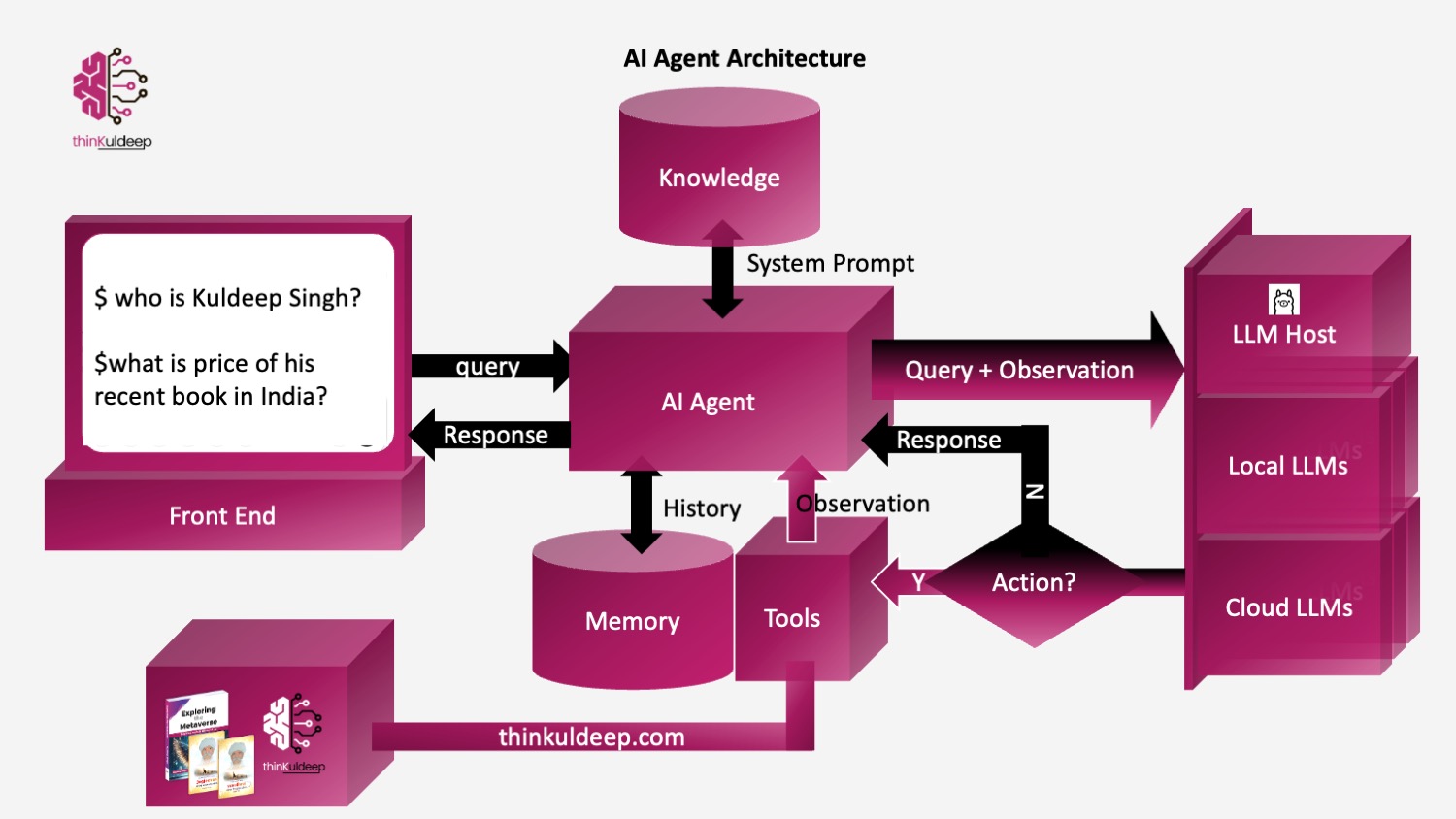
We implemented the agent using the basic architecture
Thought → Action → Observation → Reasoning → Answer
Where the agent relied on OpenAI LLMs hosted over cloud and accessed through a python SDK. While powerful, this setup requires:
- an API key
- internet connectivity
- a paid cloud account
In this article, we will build the same Agentic AI system using local open-source models — running entirely on your machine
Following the below architecture.
Hosting Local LLMs with Ollama
Ollama allows you to run Large Language Models locally, similar to ChatGPT, OpenAI — but without cloud dependency.
👉 Think of Ollama as Docker for AI models
Download → Run → Chat → Build locally
Getting Started with Ollama
- Install
$ brew install ollama - Start the service:
$ ollama serve - Pull a model:
(on other terminal)
$ ollama pull llama3 - Run the model
 $ ollama run llama3
 $ >>> What is capital of India
   The capital of India is New Delhi.
💡Tips
- 💡Ollama automatically uses your Mac’s GPU (Metal acceleration) for better performance on Apple Silicon.
- 📦 Models are stored under
~/.ollama/models. llama3is 4.7GB model, best in class, however if we want speed and good general purpose laptop, we may find better option likephi3,deepseek-coder,gemma:2b,qwen2.5:7b, etc based on the needd- Ollama exposes a local HTTP API: http://localhost:11434
👤 Using Ollama in the About-Me Agent
In the previous hands-on, we created an agent that answers questions about a person (in this case, me ) by fetching real data from a source instead of hallucinating.
Example query:
You: Who is Kuldeep Singh? You: Books from Kuldeep?
Previously we used:
client = OpenAI(api_key=openai_key)
Now we replace it with a local Ollama chat call.
Ollama Agent Client
OLLAMA_URL = "http://localhost:11434/api/chat"
LLM_NAME = "llama3"

class Agent:
    ...
    def execute(self):
        response = requests.post(
            OLLAMA_URL,
            json={
                "model": LLM_NAME,
                "messages": self.messages,
                "stream": False,
                "options": {
                    "temperature": 0,
                    "num_predict": 1024
                }
            },
            timeout=1200
        )
        response.raise_for_status()
        return response.json()["message"]["content"]
The About-Me Agent Prompt
The agent behaviour remains identical. Only the LLM backend changes.
about-me-agent.md
You operate using an internal loop:

Thought → Action → Observation → Answer

Think before answering.
Use tools when information is required.
Wait for Observation after every Action.
Provide final Answer only when sufficient information exists.

Available Tool:
Action: about: <query>
Detailed file can be found on the git source..
The tool simply retrieves trusted context: about: query?
about_map = {
    "Kuldeep Singh": "https://thinkuldeep.com/about/",
    "Kuldeep Singh's books": "https://thinkuldeep.com/about/books/",
}
Running the Agent
$ python about-me-agent/about-agent-local.py
  You: kuldeep's book
The agent:
- reasons about the request
- calls the about tool
- receives observation
- generates the final answer
Result:
✅ Final Answer: Kuldeep Singh has authored three notable books:
   Jagjeevan: Living Larger Than Life,
   Exploring the Metaverse,
   My Thoughtworkings - The guiding thoughts that work for me.
We achieved the same capability as OpenAI — fully local.
📚Books Agent using Ollma
Similar way, let’s extend the concept for the Books agent we built earlier, the agent that can:
- fetch books price from respective site pages - Exploring The Metaverse and Jagjeevan
- perform calculations
- combine multiple tool results
The system prompt includes -
Available Tool:

Tool Name: book_price
- Description: returns the price of book in given country. use default country india.
- Format: `Action: book_price: <book name>, <country>`
- Example: `Action: book_price: Exploring the Metaverse, India`

Tool Name: calculate
- Description: Runs a calculation and returns the number - uses Python so be sure to use floating point syntax if necessary
- Format: `Action: calculate: expression`
- Example: `Action: calculate: 4 * 7 / 3`
Agent Workflow
The agent autonomously:
- Retrieves price of Book A
- Retrieves price of Book B
- Calculates total
- Returns final answer
Example query:
Check total price of Exploring the Metaverse and Jagjeevan in India
python books-agent/books-agent-local.py
You: price of exploring the metaverse and jagjeevan in india

✅ Final Answer:
 The total price of Exploring the Metaverse and Jagjeevan in India is ₹1041.
Performance Reality: Local vs Cloud Models
The result matches OpenAI — but execution takes longer.
Why?
Local models trade:
✅ Privacy
✅ Zero API cost
✅ Offline capability
for
❌ Higher latency
❌ Hardware dependency
Choosing the Right Ollama Model
Try different models:
ollama pull phi3:mini
ollama pull qwen2.5:7b
Then switch:
LLM_NAME = "qwen2.5:7b"

response = requests.post(
            OLLAMA_URL,
            json={
                "model": LLM_NAME,
                "messages": self.messages,
                "stream": False,
                "options": {
                    "temperature": 0,
                    "num_predict": 1024
                }
            },
            timeout=1200
        )
| Model | Result |
|---|---|
| llama3 | Accurate but slower |
| qwen2.5:7b | Best balance |
| phi3:mini | Fast but hallucinated |
You can further tune:
"options": {
             "temperature": 0,
             "num_ctx": 4096,
             "num_predict": 300,
             "num_gpu": 1
          }
Local models improve continuously — but cloud APIs still lead in speed and reasoning reliability.
GUI Integration
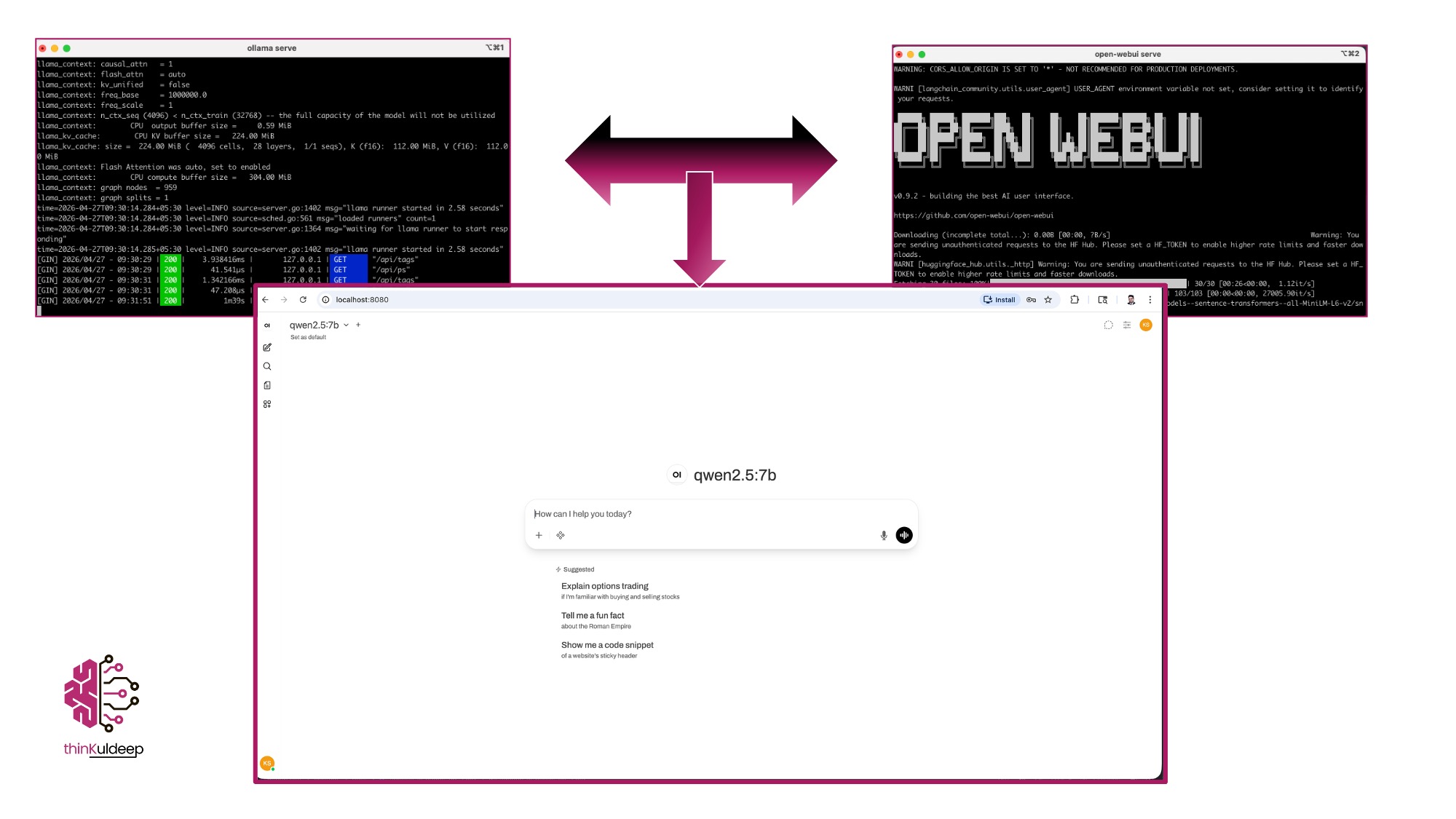
Several GUI support Ollama :
-
 $ source venv/bin/activate
 $ pip install open-webui
 $ open-webui serve
Web UI available at http://localhost:8080
Key Learning
Agentic AI is not about the model alone.
It is about:
- structured prompting
- reliable tools
- controlled execution loops
- strong engineering foundations
Switching from OpenAI → Ollama required almost zero agent redesign.
🚀 What’s Next
- Memory & long-term context
- Multi-agent collaboration
- Production failure patterns
- Observability for AI agents
🔗 References
https://github.com/aipractices/ai-agents https://thinkuldeep.com/post/agentic-ai-hands-on/ https://www.udemy.com/course/ai-agents/ https://www.youtube.com/watch?v=cZaNf2rA30k https://medium.com/@rodrigo.estrada/build-a-local-ai-coding-assistant-qwen3-ollama-continue-dev-cee0dbcd172a https://kulkarnishreenidhi.medium.com/building-a-local-ai-agent-with-python-a-practical-implementation-guide-b45f71cffdfb
#evolution #ai #genai #technology #prompt #tutorial #learnings #RAG #fine-tuning #development #embeddings #agenticai #future #practice