Mastering Python - AI Writes Code. Developers Must Understand It
- 8 minutes read - 1589 wordsAI can generate code in seconds. As a result, the role of developers is rapidly shifting—from writing code to reviewing, guiding, and constraining AI-generated outputs to ensure they truly fit the need.
However, effective code review is not easy.
The expertise required to review AI-generated code cannot exist without first writing code yourself. First-hand experience—debugging, structuring, breaking, and fixing systems—is what builds the intuition needed to evaluate correctness, performance, and maintainability.
This is especially true for Python, which has become a key language for AI experimentation and development.
In this article, we will not rely on AI to generate code. Instead, we will walk step-by-step through building a real application, helping you gain the hands-on experience necessary to become a strong AI-assisted developer.
Getting Started with Python
If you’re new to Python, I recommend taking a structured course such as:
You can even aim to complete it and earn a certificate, like I did :)—it’s a great way to build momentum.
That said, if you already have experience with another programming language, you can directly start with the project below and learn Python along the way.
Learn by Building: A Book Store Application
We will build a full-stack web application using Python.
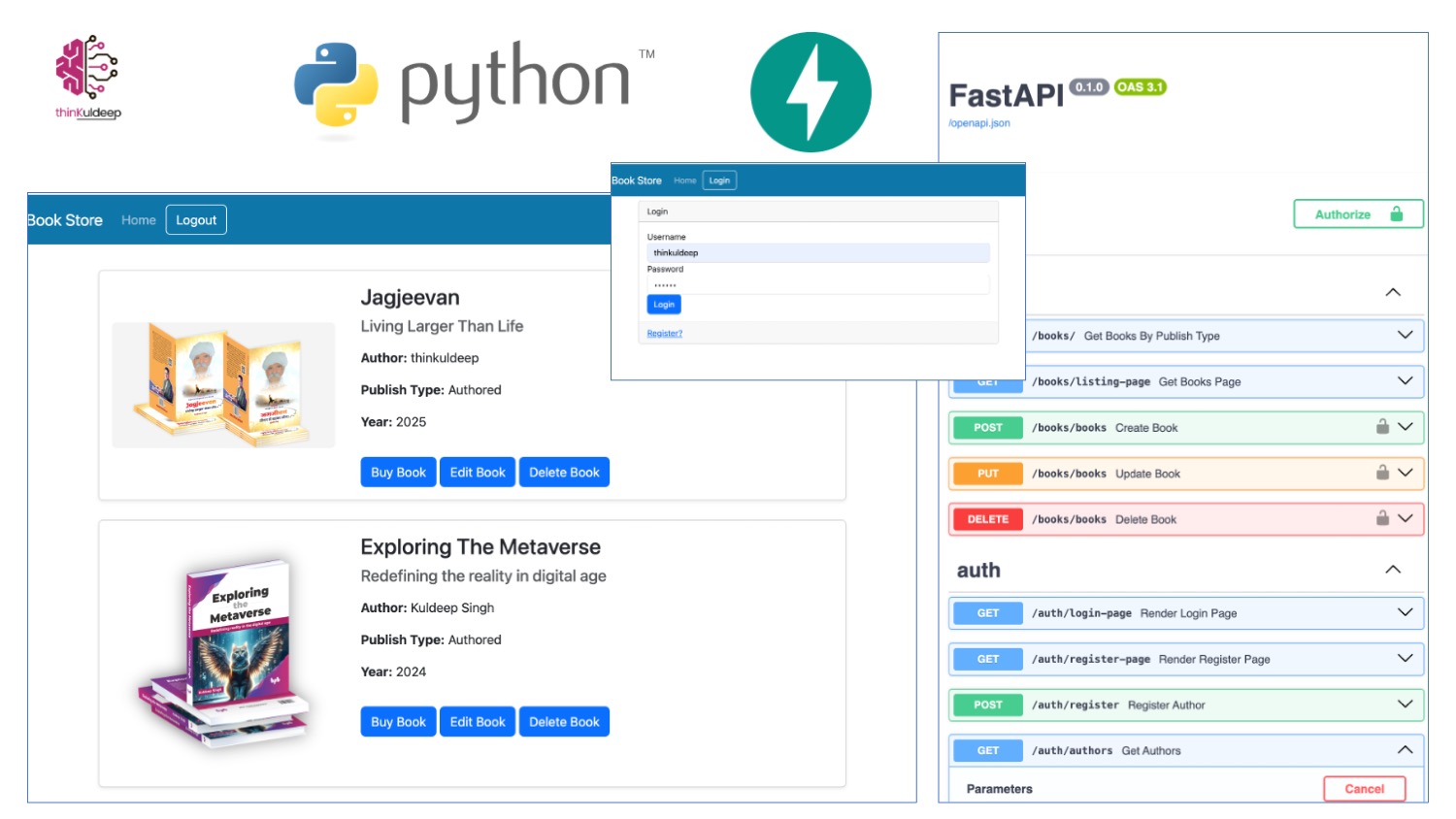
The application will:
- Maintain a collection of books
- Allow authors to register and manage their books
- Include authentication and authorization
- Follow good engineering practices like Test-Driven Development (TDD) from start.
Project Setup
Ensure you have the following installed:
Install Dependencies
Open terminal in the project and install
(venv) ➜ BookStore git:(main) pip install fastapi
- The API Library - fastapi
- Python Unit Testing - pytest
- Accessing HTTP APIs - httpx
- Template Engine for Web - jinja2
- ASGI Web Server - ‘uvicorn[standard]’
We will add more dependencies as needed.
Step 1: Hello World (Health Check)
Start with a simple /status endpoint.
Test First (TDD)
test_main.py
client = TestClient(app)
def test_status_page():
    response = client.get("/status")
    assert response.status_code == status.HTTP_200_OK
    assert "Healthy" in response.text
Implementation
main.py
BASE_DIR = os.path.dirname(os.path.abspath(__file__))
templates = Jinja2Templates(directory=os.path.join(BASE_DIR, "templates"))
app = FastAPI()
def get_health_status():
    return "Healthy"
@app.get("/status")
def status_page(request: Request):
    return templates.TemplateResponse(request,'status.html', {"health_status": get_health_status() }  )
<!DOCTYPE html>
<html lang="en">
<head>
    <title>Book Store</title>
</head>
<body>
    <h1>Welcome to My Book Store!</h1>
    <h2>Status: {{ health_status }}</h2>
</body>
</html>
Run Tests
(venv) ➜  BookStore git:(main) ✗ pytest -v
=========================================================================================== test session starts ===========================================================================================
platform darwin -- Python 3.12.7, pytest-9.0.2,
collected 1 item
test/test_main.py::test_status_page PASSED   [100%]
============================================================================================ 1 passed in 0.15s ============================================================================================
Run the Book Store
Start the app in web-server.
(venv) ➜  BookStore git:(main) ✗ uvicorn main:app --reload
INFO:     Uvicorn running on http://127.0.0.1:8000 (Press CTRL+C to quit)
INFO:     Waiting for application startup.
INFO:     Application startup complete.
access it at http://127.0.0.1:8000/status and see swagger docs at http://127.0.0.1:8000/docs
Step 2: API Routing
Let’s add a separate route for APIs for "/books" in books.py
router = APIRouter(prefix="/books", tags=["Books"])

@router.get("/", status_code=status.HTTP_200_OK)
async def get_books():
    return []
include it in main.py
app.include_router(books.router)
Let’s test it with test client in test_books.py
client = TestClient(app)
def test_get_all_books():
    response = client.get("/books")
    assert response.status_code == status.HTTP_200_OK
Step 3: Database Integration
Install ORM Tool - SQLAlchemy using pip add initialise DB
The DB Model
models.py
class Books(Base):
    __tablename__ = 'books'
    title = Column(String, primary_key=True, index=True)
    sub_title = Column(String)
    author = Column(String)
    image_link = Column(String)
    buy_link = Column(String)
    publish_type = Column(String)
    publish_year = Column(Integer)
Database Setup
db.py for sqlite db.
engine = create_engine('sqlite:///./bookstore.db', connect_args={'check_same_thread': False})
SessionLocal = sessionmaker(autocommit=False, autoflush=False, bind=engine)
Base = declarative_base()
Dependency Injection
Inject DB Dependency in Get All Books API, and read from DB.
def get_db():
    db = SessionLocal()
    try:
        yield db
    finally:
        db.close()

db_dependency = Annotated[Session, Depends(get_db)]

@router.get("/", status_code=status.HTTP_200_OK)
async def get_books(db: db_dependency):
    return db.query(Books).all()
Step 4: Testing with a Database
Set up a test database and override dependencies.
test/db_utils.py
engine = create_engine("sqlite:///./testdb.db", connect_args={"check_same_thread": False},poolclass = StaticPool,)
TestingSessionLocal = sessionmaker(autocommit=False, autoflush=False, bind=engine)
Base.metadata.create_all(bind=engine)

def override_get_db():
    db = TestingSessionLocal()
    try:
        yield db
    finally:
        db.close()
add fixture that executes on every declared parameter annotation.
@pytest.fixture
def test_books():
    book = Books( title = "Jagjeevan", sub_title = "Living Larger Than Life", author = "Kuldeep Singh", image_link = "https://thinkuldeep.com/images/jagjeevan_books_b.jpg", buy_link = "https://thinkuldeep.com/jagjeevan", publish_type = "Authored", publish_year = "2024")
    db = TestingSessionLocal()
    db.add(book)
    db.commit()
    yield book
    with engine.connect() as connection:
        connection.execute(text("DELETE FROM books;"))
        connection.commit()
Unit Testing DB Integration
test_books.py
app.dependency_overrides[get_db] = override_get_db
def test_get_all_books(test_books):
    response = client.get("/books")
    assert response.status_code == status.HTTP_200_OK
    assert response.json() == [{'author': 'Kuldeep Singh','buy_link': 'https://thinkuldeep.com/jagjeevan', 'image_link': 'https://thinkuldeep.com/images/jagjeevan_books_b.jpg', 'publish_type': 'Authored', 'publish_year': 2024, 'sub_title': 'Living Larger Than Life','title': 'Jagjeevan'}]
Run the unit tests
(venv) ➜  BookStore git:(main) ✗ pytest -v
test/test_books.py::test_get_all_books PASSED             [50%]
test/test_main.py::test_status_page PASSED                [100%]
Step Run the APIs
Make sure sqlite is installed on your machine and Run the web server it would create bookstore.db with the schema defined in models.py
(venv) ➜  FastAPI sqlite3 bookstore.db
SQLite version 3.51.0 2025-06-12 13:14:41
Enter ".help" for usage hints.
sqlite> .schema
CREATE TABLE books ( title VARCHAR NOT NULL,  sub_title VARCHAR,  author VARCHAR,  image_link VARCHAR,  buy_link VARCHAR, publish_type VARCHAR, publish_year INTEGER,
        PRIMARY KEY (title));
CREATE INDEX ix_books_title ON books (title);
sqlite>
Insert a record
sqlite> insert into books values("Jagjeevan", "Living Larger Than Life", "thinkuldeep", "https://thinkuldeep.com/images/jagjeevan_books_b.jpg", "https://thinkuldeep.com/jagjeevan", "Authored", 2024);
Get the inserted data http://localhost:8000/books/ or in swagger APIs
Step 5: Build the UI
Create a listing page using Jinja2 templates to render books dynamically.
Define template books.html
{% include 'layout.html' %}

<div class="container mt-4">
  {% for book in books %}
  <div class="card mb-4 shadow-sm">
    <div class="row g-0">
      <div class="col-md-4 d-flex align-items-center justify-content-center p-3">
        <img src="{{ book.image_link }}" class="img-fluid rounded" alt="{{ book.title }}">
      </div>
      <div class="col-md-8">
        <div class="card-body">
          <h3 class="card-title">{{ book.title }}</h3>
          <h5 class="text-muted">{{ book.sub_title }}</h5>
          <p class="mt-3"><strong>Author:</strong> {{ book.author }}</p>
          <p><strong>Publish Type:</strong> {{ book.publish_type }}</p>
          <p><strong>Year:</strong> {{ book.publish_year }}</p>
          <a href="{{ book.buy_link }}" target="_blank" class="btn btn-primary mt-3">
            Buy Book
          </a>
        </div>
      </div>
    </div>
  </div>
  {% endfor %}
</div>
Add Liting API
@router.get("/listing-page", status_code=status.HTTP_200_OK)
async def get_books_page(db: db_dependency, request: Request):
    return templates.TemplateResponse(request,'books.html',{"books": db.query(Books).all() })
Step 6: Authentication & Authorization
We introduce:
- Author registration
- Password hashing (passlib)
- JWT-based authentication (python-jose)
Create Author Database and Model
class Authors(Base):
    __tablename__ = 'authors'
    email = Column(String, unique=True)
    name = Column(String, primary_key=True, index=True)
    first_name = Column(String)
    last_name = Column(String)
    password = Column(String)
Register Author API
Let’s add register author, and form validation. Since we need to store password hash. lets
install passlib and bcrypt==4.0.1.
b_context = CryptContext(schemes=["bcrypt"], deprecated="auto")

class AuthorRequest(BaseModel):
    email: str = EmailStr
    name: str = Field(..., min_length=3)
    first_name: str
    last_name: str
    password:str = Field(..., min_length=3)

@router.post("/register", status_code=status.HTTP_201_CREATED)
async def register_author(db: db_dependency, author:AuthorRequest):
    author_model = Authors(**author.model_dump(mode="json"))
    author_model.password = b_context.hash(author_model.password)
    db.add(author_model)
    db.commit()
This would store author and hash.
Token Generation and User Role
Install python-jose, python-multipart, and generate JWT token.
@router.post("/token", status_code=status.HTTP_200_OK)
async def get_access_token(form : Annotated[OAuth2PasswordRequestForm , Depends()], db:db_dependency):
    author = authenticate_author(form.username, form.password, db)
    if not author:
        raise HTTPException(status_code=status.HTTP_401_UNAUTHORIZED, detail='Could not validate author.')
    token = jwt.encode({'sub': author.name, 'role':  "admin" if author.name == "thinkuldeep" else "author", 'exp': datetime.now()+timedelta(minutes=20)},
                       KEY, algorithm=ALGO)
    return {'access_token': token, 'token_type': 'bearer'}
Only registered authors or admin can add/update their books. Treat user with name “thinkuldeep” as admin :)
{
"access_token": "eyJhbGciOiJIUzI1NiIsInR5cCI6IkpXVCJ9.eyJzdWIiOiJ0aGlua3VsZGVlcCIsInJvbGUiOiJhZG1pbiIsImV4cCI6MTc3Mzk2MTQ2Mn0.m21V37Z52ObqNg39Q9IC4ccexVnORYGPLFb3WPcRiDo",
"token_type": "bearer"
}
if this token in passed along with APIs HTTP headers then we will be able to get current logged in user from this JWT from following method
oauth2_bearer = OAuth2PasswordBearer(tokenUrl='token')

async def get_current_user(token: Annotated[str, Depends(oauth2_bearer)]):
    try:
        payload = jwt.decode(token, KEY, algorithms=[ALGO])
        name: str = payload.get('sub')
        role: str = payload.get('role')
        if name is None:
            raise HTTPException(status_code=status.HTTP_401_UNAUTHORIZED, detail='No valid user')
        return {'name': name, 'role': role}
    except JWTError:
        raise HTTPException(status_code=status.HTTP_401_UNAUTHORIZED, detail='Could not validate user.')
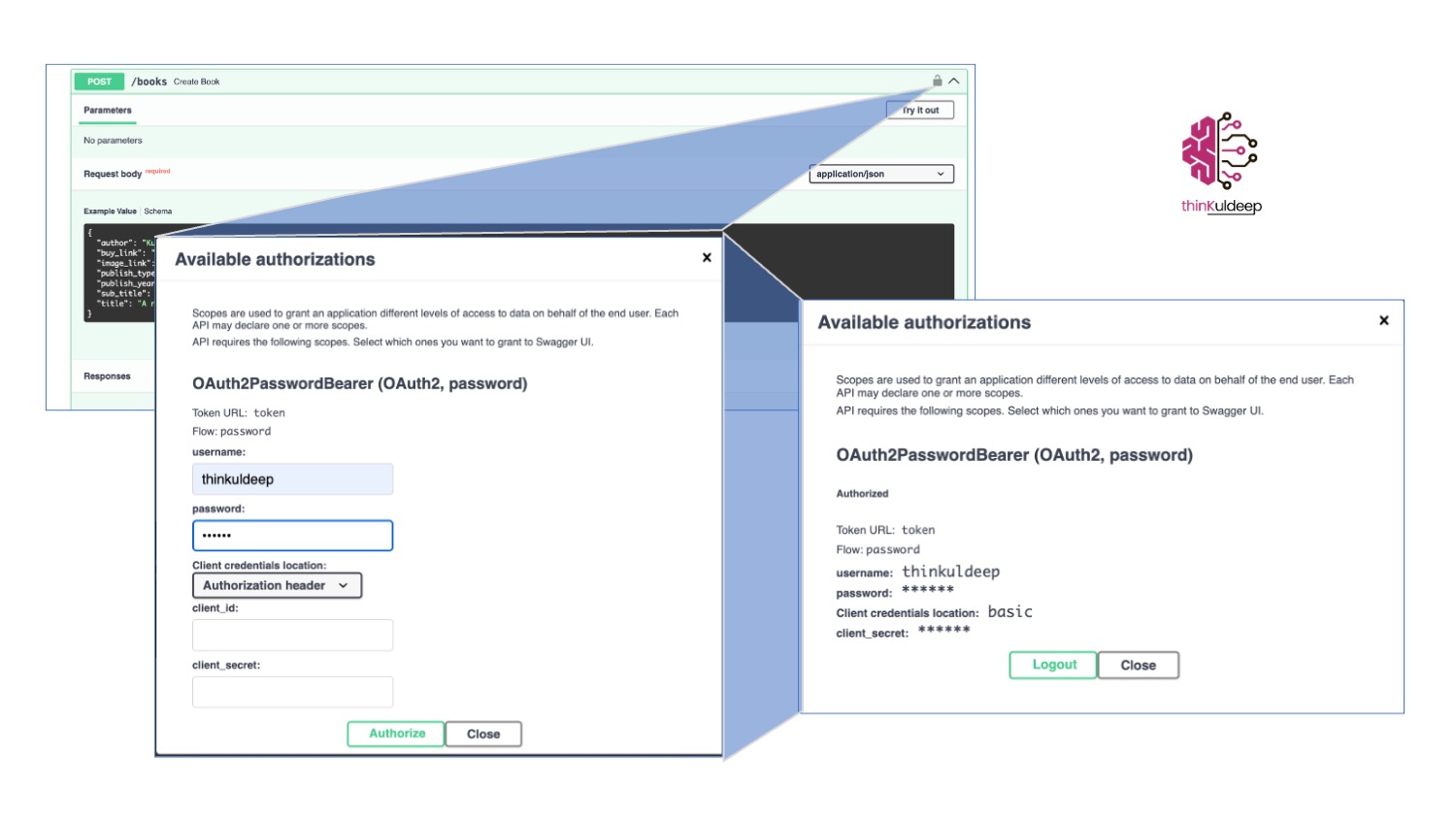
Step 7: Secure APIs
Only authenticated users can:
-
Add books
-
Update books
-
Delete books
-
Admins can modify any book; authors can only modify their own.
author_dependency = Annotated[dict, Depends(get_current_user)]

@router.post("/books", status_code=status.HTTP_201_CREATED)
async def create_book(author : author_dependency,db: db_dependency, book:BookRequest):
    if author is None: raise HTTPException(status_code=401, detail='Not authorized to add book')
    db.add(Books(**book.model_dump(mode="json")))
    db.commit()
Allow authenticated auther or user with admin role to update/delete the book.
@router.put("/books", status_code=status.HTTP_202_ACCEPTED)
async def update_book(author : author_dependency, db: db_dependency, book:BookRequest):
    book_model = None
    if author is None: raise HTTPException(status_code=401, detail='Not authorized to update a book')
    if author.get('role') == "admin":
        book_model = db.query(Books).filter(book.title == Books.title).first()
        if book_model is None:
            raise HTTPException(status_code=404, detail='Book not found.')
    elif author.get('role') == "author" :
        book_model = db.query(Books).filter(book.title == Books.title,  author.get('name') == Books.author).first()
        if book_model is None:
            raise HTTPException(status_code=404, detail='Book not found.')

    update_data = book.model_dump(mode="json")

    for key, value in update_data.items():
        setattr(book_model, key, value)
    db.commit()
    db.refresh(book_model)


@router.delete("/books", status_code=status.HTTP_204_NO_CONTENT)
async def delete_book(author : author_dependency, db: db_dependency, title: str):
    if author is None: raise HTTPException(status_code=401, detail='Not authorized to delete a book')
    if author.get('role') == "admin":
        db.query(Books).filter(title == Books.title).delete()
    elif author.get('role') == "author" :
        (db.query(Books).filter(book.title == Books.title,  author.get('name') == Books.author)).delete()
    db.commit()
Step 8: UI + Auth Integration

Update listing page API to pass the user context if user token exists in request cookies.
@router.get("/listing-page", status_code=status.HTTP_200_OK)
async def get_books_page(db: db_dependency, request: Request):
    user = None
    token = request.cookies.get('access_token')
    if token is not None:
        user = await get_current_user(token)
    return templates.TemplateResponse(request,'books.html',{"books": db.query(Books).all(), "user": user })
Run the Application
uvicorn main:app --reload
Access:
- App: http://127.0.0.1:8000/status
- Swagger Docs: http://127.0.0.1:8000/docs
What You Achieved
By building this project, you have:
- Written real Python code
- Practiced TDD
- Built APIs using FastAPI
- Integrated a database
- Implemented authentication and authorization
- Created a full-stack web application
Final Thought
Before relying on AI to generate code, invest time in writing it yourself.
AI can accelerate development—but only if you have the judgment to:
- Identify incorrect outputs
- Refine generated code
- Ensure long-term maintainability
Hands-on experience is what transforms you from an AI user into an AI-empowered engineer.
Next Steps
You can extend this project by adding:
- Database migrations (Alembic)
- Deployment (Render, Docker)
- Caching and performance optimization
- Observability and logging
Source Code
GitHub: https://github.com/thinkuldeep/BookStore
Detailed course can be found here
#python #introduction #language #tdd #xp #technology #interoperability #web app #jagjeevan #books #ai #code review #hands-on #practices