Server Driven UI with KMP - Cross Platform App Development
- 9 minutes read - 1744 wordsOver the years, I’ve written about interoperability and why it is essential for enterprise systems that must cross technological and business boundaries. Enterprises applications rarely live in isolation. They integrate across platforms, stacks, and ecosystems. Without proper planning, maintaining multiple platforms and technology stacks quickly becomes expensive and complex.
This challenge becomes even more evident in cross-platform mobile development. I have previously explored solutions like Unity, PhoneGap (Now Cordova), React Native and Titanium. Each promised “write once, run everywhere.” Yet, there has always been a trade-off:
- Native performance vs. wrapper-based rendering
- Platform consistency vs. shared code
- Deployment overhead vs. runtime flexibility
Recently, I explored Kotlin Multiplatform (KMP), which provides a powerful alternative: sharing logic (and even UI with Compose Multiplatform) while still rendering natively.
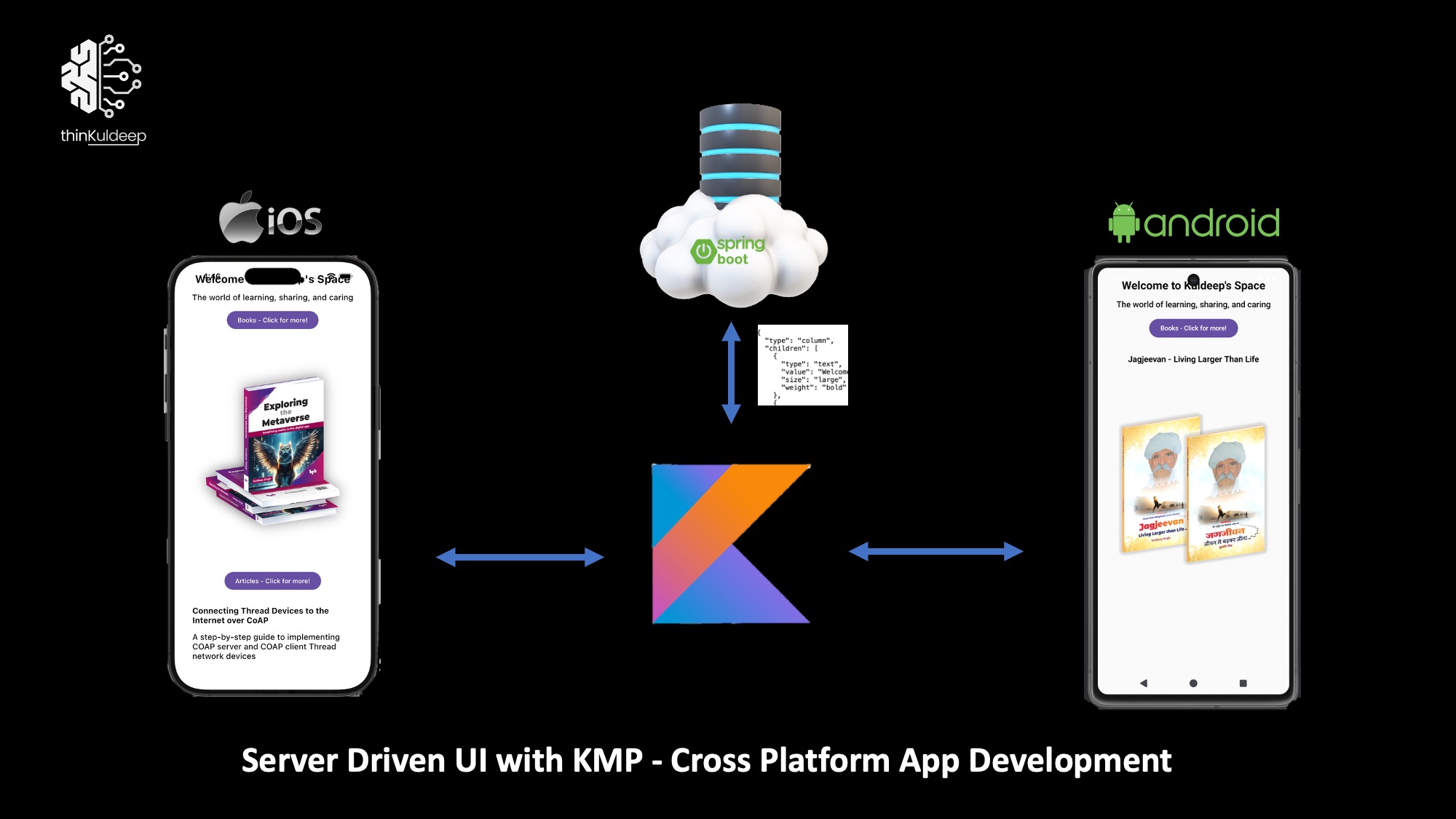
When combined with Server Driven UI (SDUI), we unlock something even more powerful:
Define UI on the server → deliver as JSON → render natively on Android & iOS → change UI without redeploying apps.
In this article, we will build a simple end-to-end SDUI system using:
- Spring Boot (Server)
- Kotlin Multiplatform (Client)
- Compose Multiplatform (Rendering)
- Ktor Client (Networking)
Hands-on. Practical. End-to-end.
What You Need
- Java 21 (recommended)
- IntelliJ IDEA (recommended) with Kotlin Multiplatform plugin
- [Android Studio](Android Studio) (just for SDK and tools installation)
- Xcode
> xcode-select --install
Step 1 - Project Setup
We will create:
SDUIPractices/
├── sdui-server
└── sdui-client
Full source code is available here: 👉 https://github.com/thinkuldeep/SDUIPractices
We will setup Project Home and create server and client project setup in it. The complete project source is avaiable here in Git.
Alternatively you may follow below steps to setup a fresh.
1.1 SDUI Server Setup (Spring Boot)
Create a Spring Boot project via https://start.spring.io
- Language: Kotlin
- Dependencies:
- Spring Web
- DevTools
Artifact: sdui-server
Run the server:
SDUIPractices/sdui-server> ./gradlew bootRun
Access: http://localhost:8080
1.2 Kotlin Multiplatform Client Setup
Create a new project: File → New → Project → Kotlin Multiplatform - select Android and iOS.
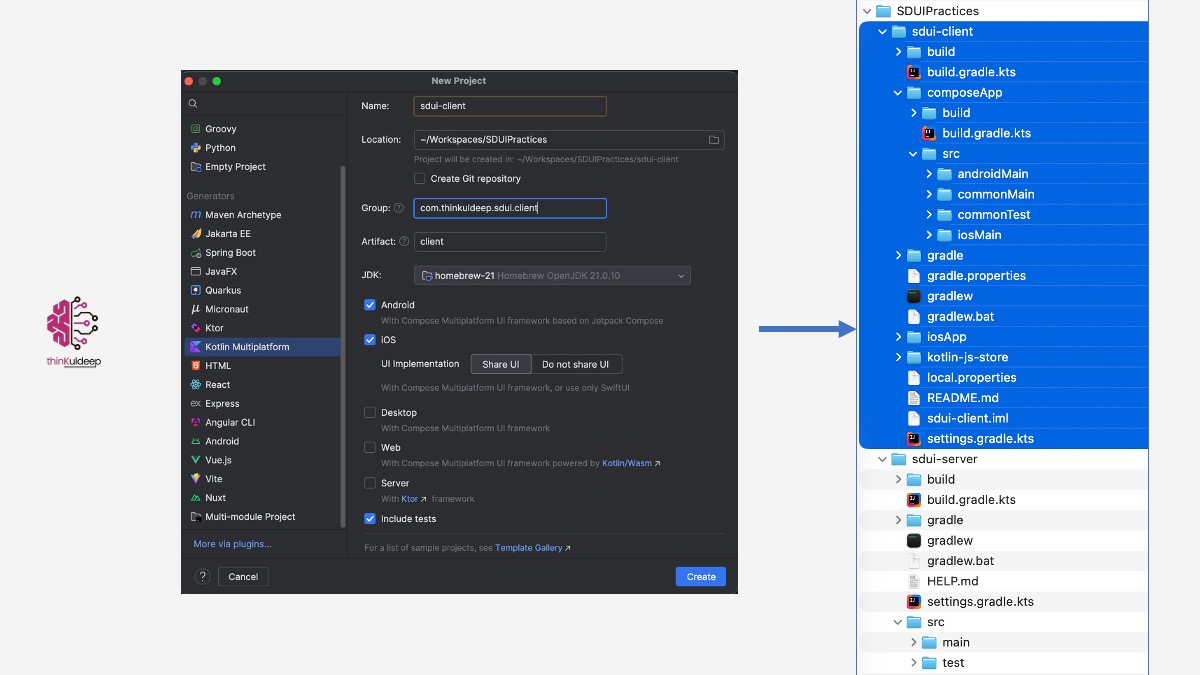
Follow the official Compose Multiplatform guide to verify Android and iOS run successfully.
If you encounter version issues:
- Update
libs.versions.toml - Verify
local.propertiesfor Android SDK - Open iOS app once in Xcode and sign in
Once the sample runs on both platforms — you’re ready!
Step 2 – Delivering UI from Server
Let’s build a landing page consists of following item for my website thinkuldeep.com
- Title
- Subtitle
- Featured items
- Button-driven interaction
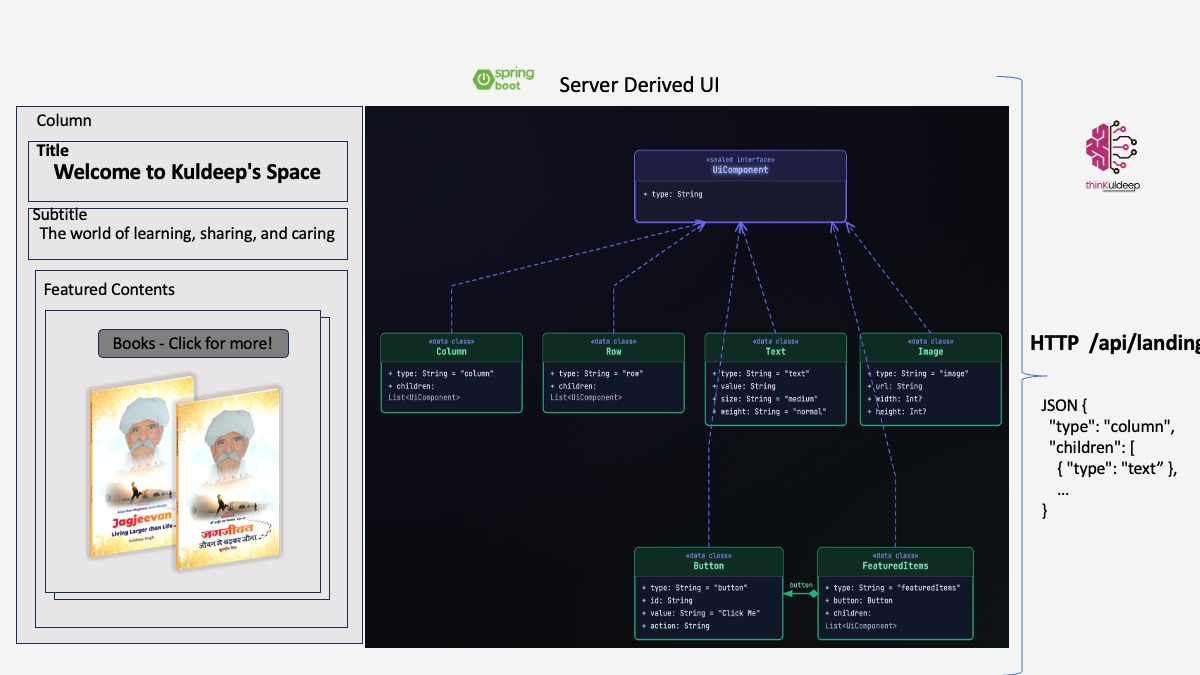
2.1 Define Server-Side UI Model
sealed interface UiComponent { val type: String }
data class Column(override val type: String = "column",  val children: List<UiComponent>) : UiComponent
data class Text(override val type: String = "text", val value: String,  val size: String = "medium", val weight: String = "normal") : UiComponent
data class Image(override val type: String = "image",  val url: String,  val width: Int? = null, val height: Int? = null) : UiComponent
data class Button(override val type: String = "button", val id: String, val value: String = "Click Me", val action: String) : UiComponent
data class FeaturedItems(override val type: String = "featuredItems",  val button : Button, val children: List<UiComponent>) : UiComponent
2.2 Expose REST Endpoint
@RestController
class LandingPageController {
    @GetMapping("/api/ui/landing")
    fun landingPage(): UiComponent {
        val title = Text( value = "Welcome to Kuldeep's Space", size = "large", weight = "bold")
        val subtitle = Text( value = "The world of learning, sharing, and caring",  size = "medium", weight = "medium")
        val books = FeaturedItems( button=Button(id= "books", value = "Books - Click for more!", action = "load_next_feature"), children = listOf(
            Column(children = listOf(Text( value = "Jagjeevan - Living Larger Than Life",  size = "medium", weight = "bold"), Image( url = "https://thinkuldeep.com/images/Jagjeevan_book.png", width = 488, height = 503))),
            Image(url = "https://thinkuldeep.com/images/exploring-the-metaverse-books.png", width = 465, height = 503),
            Image(url = "https://thinkuldeep.com/images/MyThoughtworkings.jpg", width = 893, height = 503),))

        return Column( children = listOf( title,  subtitle, featureItems))
    }
}
Test: http://localhost:8080/api/ui/landing and You should receive JSON representing the UI tree.
Step 3 – Consuming SDUI in KMP
Now the fun part.
3.1 Shared UI Model (Client Side)
Inside: sdui-client/composeApp/src/commonMain/
@Serializable
sealed class UiComponent {
    @Serializable  @SerialName("column")
    data class Column( val children: List<UiComponent> ) : UiComponent()
    @Serializable @SerialName("text")
    data class Text( val value: String,  val size: String = "medium", val weight: String = "normal") : UiComponent()
    @Serializable @SerialName("image")
    data class Image( val url: String, val width: Int? = null,  val height: Int? = null) : UiComponent()
    @Serializable @SerialName("featuredItems")
    data class FeaturedItems( val button: Button, val children: List<UiComponent>) : UiComponent()
    @Serializable @SerialName("button")
    data class Button( val  id: String,  val value: String, val action: String) : UiComponent()
}
Note that you would need kotlinx.serialization dependencies to be added. Follow the GitHub source here.
3.2 Networking with Ktor
class UiRepository {
  private val client = HttpClient {
    install(ContentNegotiation) {
      json( Json { ignoreUnknownKeys = true
        classDiscriminator = "type"
      })
    }
  }
  suspend fun fetchLanding(): UiComponent {
    try {
      println("🔥 fetchLanding - ${PlatformConfig.baseUrl}/api/ui/landing" )
      return  HttpClientFactory.client.get("${PlatformConfig.baseUrl}/api/ui/landing").body();
    } catch (e: Exception) {
      println("❌ ERROR: ${e.message}")
      throw e
    }
  }
}
Platform-specific base URL:
expect object PlatformConfig {
    val baseUrl: String
}
3.3 Renderer (Compose)
@Composable
fun Render(component: UiComponent, viewModel: LandingViewModel) {
    when (component) {
        is UiComponent.Column -> {
            Column(horizontalAlignment = Alignment.CenterHorizontally, modifier = Modifier.fillMaxSize().padding(16.dp)) {
                component.children.forEach { Render(it, viewModel) }
            }
        }
        is UiComponent.Text -> {
            Text( text = component.value,  fontSize = when (component.size) {
                    "large" -> 24.sp
                    "medium" -> 18.sp
                    else -> 14.sp
                },
                fontWeight = when (component.weight) {
                    "bold" -> FontWeight.Bold
                    "medium" -> FontWeight.Medium
                    else -> FontWeight.Normal
                },
                modifier = Modifier.padding(8.dp))
        }
        is UiComponent.Image -> {
            KamelImage( resource = asyncPainterResource(component.url), contentDescription = null,
                modifier = Modifier.padding(8.dp).then(
                        if (component.width != null && component.height != null)
                            Modifier.size(component.width.dp, component.height.dp)
                        else Modifier))
        }
        is UiComponent.Button -> {
            Button( onClick = { viewModel.dispatch(component.action, component.id) },
              modifier = Modifier.padding(8.dp)) { Text(component.value) }
        }

        is UiComponent.FeaturedItems -> {
            Render(component.button, viewModel)
            val firstChild = component.children.firstOrNull()
            firstChild?.let {
                Render(it, viewModel)
            }
        }
    }
}
This renderer handles all generic components. Notice that for
FeaturedItems, only the first child is rendered initially. The remaining children should be displayed when the associated button is clicked. To enable this behavior, we dispatch the button action to the ViewModel, which will handle the state update as described in the next section.
3.4 ViewModel
Responsibilities:
- Load UI from network
- Store original tree
- Filter featured items
- Handle button actions
class LandingViewModel {
    private val repository = UiRepository()
    private val scope = CoroutineScope(Dispatchers.Default)
    val uiState: StateFlow<UiComponent?> = MutableStateFlow<UiComponent?>(null)
    private val featureIndexes = mutableMapOf<String, Int>()
    private var originalTree: UiComponent? = null

    init {
        println("🔥 ViewModel INIT")
        load()
    }

    private fun load() {
        scope.launch {
            try {
                val root = repository.fetchLanding()
                originalTree = root
                uiState.value = applyFeatureFilter(root)
            } catch (e: Exception) {
                println("❌ ViewModel error: ${e.message}")
            }
        }
    }
    fun dispatch(action: String, componentId: String?) {
        when (action) {
            "load_next_feature" -> {
                componentId?.let { id ->
                    val current = featureIndexes[id] ?: 0
                    featureIndexes[id] = current + 1
                    originalTree?.let {
                        uiState.value = applyFeatureFilter(it)
                    }
                }
            }
        }
    }

  private fun applyFeatureFilter(component: UiComponent): UiComponent {
        return when (component) {
            is UiComponent.Column -> {
                component.copy(
                    children = component.children.map {
                        applyFeatureFilter(it)
                    }
                )
            }
            is UiComponent.FeaturedItems -> {
                val items = component.children
                if (items.isEmpty()) return component
                val index = featureIndexes[component.button.id] ?: 0
                val safeIndex = index % items.size
                component.copy(
                    children = listOf(items[safeIndex])
                )
            }
            else -> component
        }
    }
}
With this we are ready with core part of SDUI client side!
Step 4 - Platform Integration
4.1 Android
Android App starts at the MainActivity, and once UI state is loaded, set landing page content loaded from LandingViewModel.
KMP generate default android source at /sdui-client/composeApp/src/androidMain/
class MainActivity : ComponentActivity() {
    override fun onCreate(savedInstanceState: Bundle?) {
        super.onCreate(savedInstanceState)
        setContent {
            val vm = remember { LandingViewModel() }
            val state = vm.uiState.collectAsState()
            state.value?.let {
                Render(it, vm)
            }
        }
    }
}
Note: - For Android emulator use
10.0.2.2as host instead oflocalhost. For real device use real IP/host of server.
actual object PlatformConfig {
    actual val baseUrl: String = "http://10.0.2.2:8080"
}
Also note that, latest android only allow HTTPS, and to access HTTP URL, need to make following changes
- Add
androidMain/res/xml/network_security_config.xml
<?xml version="1.0" encoding="utf-8"?>
<network-security-config>
    <domain-config cleartextTrafficPermitted="true">
        <domain includeSubdomains="">10.0.2.2</domain>
    </domain-config>
</network-security-config>
androidMain/AndroidManifest.xml
 <application
        android:allowBackup="true"
        android:label="@string/app_name"
        android:networkSecurityConfig="@xml/network_security_config"
        android:usesCleartextTraffic="true" ...>
Android is ready now! and we will run the app in a while.
4.1 iOS App
Let’s map similar composable logic for iOS in MainViewController that we will use iOS app next.
/sdui-client/composeApp/src/iosMain/
fun MainViewController() = ComposeUIViewController {
    val vm = remember { LandingViewModel() }
    val state = vm.uiState.collectAsState()
    state.value?.let {
        Render(it, vm)
    }
}
For iOS simulator : use localhost or read ip.
actual object PlatformConfig {
    actual val baseUrl: String = "http://localhost:8080"
}
iOS Native App
The iOS Entry Point is the @main in sdui-client/iosApp/iosApp/iOSApp.swift this is KMP generated.
import SwiftUI

@main
struct iOSApp: App {
    var body: some Scene {
        WindowGroup {
            ContentView()
        }
    }
}
The ContentView is defined in sdui-client/iosApp/iosApp/ContentView.swift as follows, where we link MainViewControllerKt.MainViewController()
import UIKit
import SwiftUI
import ComposeApp

struct ComposeView: UIViewControllerRepresentable {
    private let controller = MainViewControllerKt.MainViewController()
    func makeUIViewController(context: Context) -> UIViewController {
        controller
    }
    func updateUIViewController(_ uiViewController: UIViewController, context: Context) {}
}

struct ContentView: View {
    var body: some View {
        ComposeView()
            .ignoresSafeArea()
    }
}
This links MainViewContrller, and eventually integrates with LandingViewModel from KMP.
With this we are ready to run the applications in respective platform!
Run the System
Run the SDUI Server
Start Spring Boot -
  .   ____          _            __ _ _
 /\\ / ___'_ __ _ _(_)_ __  __ _ \ \ \ \
( ( )\___ | '_ | '_| | '_ \/ _` | \ \ \ \
 \\/  ___)| |_)| | | | | || (_| |  ) ) ) )
  '  |____| .__|_| |_|_| |_\__, | / / / /
 =========|_|==============|___/=/_/_/_/

 :: Spring Boot ::                (v4.0.3)

2026-03-02T12:28:00.850+05:30  INFO 9499 --- [sdui-server] [  restartedMain] c.t.sdui.server.SduiServerApplicationKt  : Starting SduiServerApplicationKt using Java 21.0.10 with PID 9499 (/Users/kuldeeps/Workspaces/SDUIPractices/sdui-server/build/classes/kotlin/main started by kuldeeps in /Users/kuldeeps/Workspaces/SDUIPractices/sdui-server)
2026-03-02T12:28:02.075+05:30  INFO 9499 --- [sdui-server] [  restartedMain] b.w.c.s.WebApplicationContextInitializer : Root WebApplicationContext: initialization completed in 1177 ms
2026-03-02T12:28:02.633+05:30  INFO 9499 --- [sdui-server] [  restartedMain] o.s.boot.tomcat.TomcatWebServer          : Tomcat started on port 8080 (http) with context path '/'
Run Android and iOS App
Run android and iOS App as described in the KMP guide.
Here is a demo of this app.
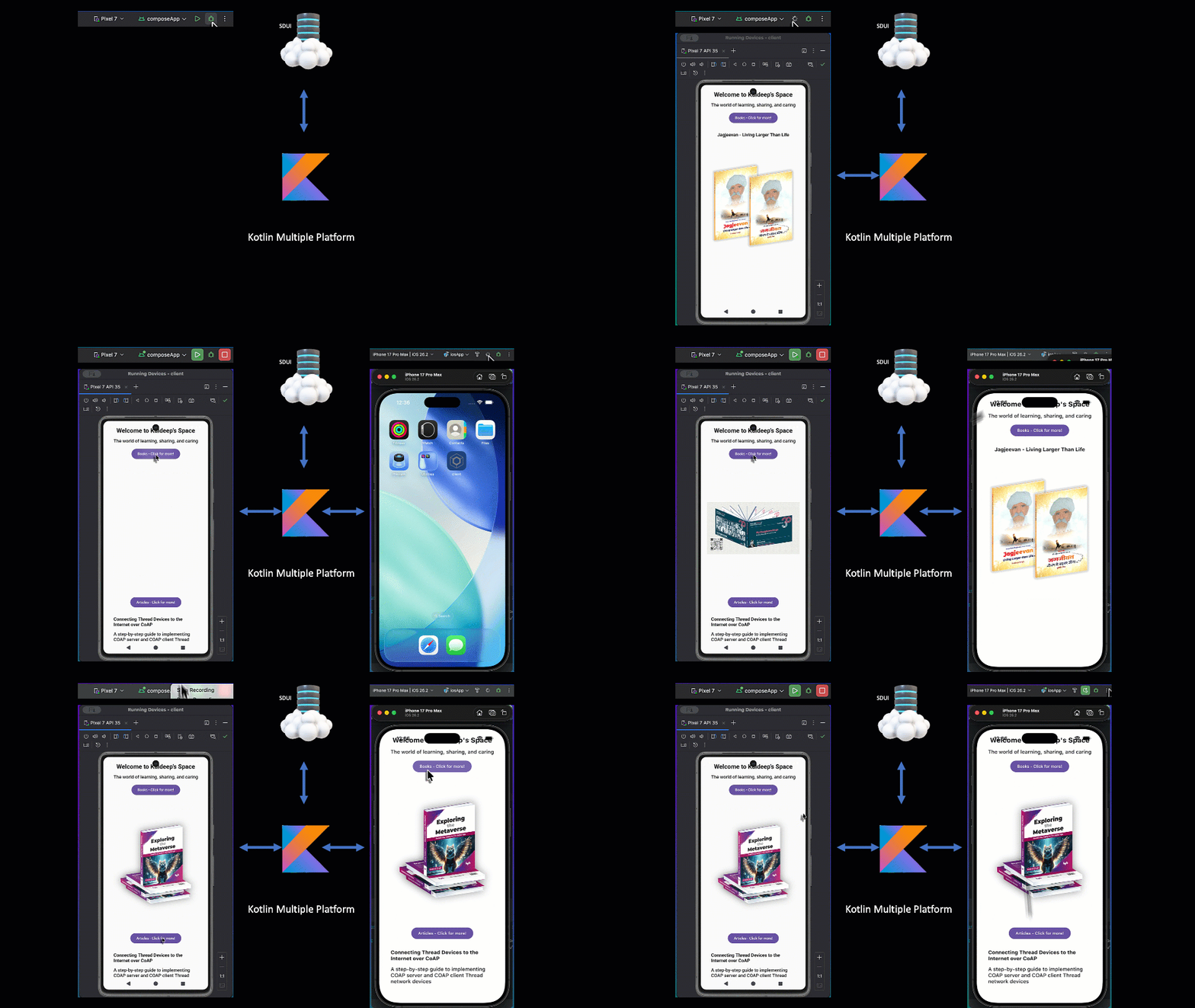
Try changing server side response and reload the app, and the changes in respective app without any redeployment. That’s the power of Server Driven UI.
Conclusion
We built a complete SDUI system using:
- Spring Boot
- Kotlin Multiplatform
- Compose Multiplatform
- Ktor Client
This is just the beginning.
Next topics:
- Navigation strategies
- Versioning strategies
- State management patterns
- Testing SDUI
- Production architecture patterns
- Performance considerations and best practices
Stay tuned!
Keep learning. Keep sharing.
#kotlin-multiplatform #kotlin #enterprise #integration #technology #interoperability #mobile #android #iOS #Unity